What Is ERP Software?
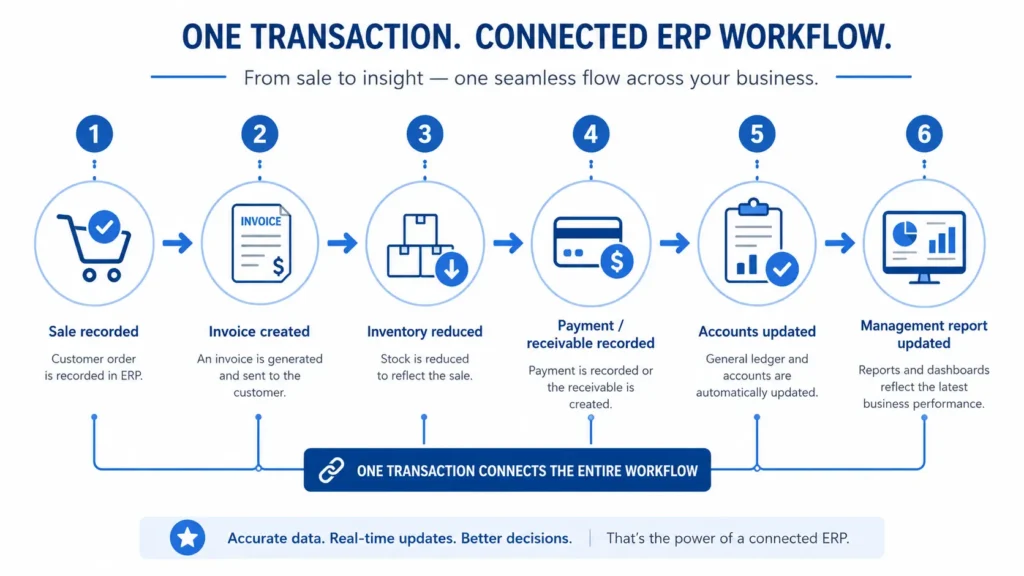 ERP, or enterprise resource planning software, connects operational and financial processes through shared data. These commonly include sales, POS billing, inventory, purchasing, suppliers, expenses, accounting, receivables, payables and reporting.
The value lies in how those functions work together:
Sale recorded → invoice created → inventory reduced → payment or receivable recorded → accounts updated → management report updated
Without that connection, employees may enter the same activity in several places.
A company does not need to be a large enterprise to use ERP. ERP software for small businesses in Pakistan can make sense when registers, Excel sheets or disconnected applications make inventory, supplier balances, expenses or reports difficult to trust.
Need better control over inventory?
See how HisaabPro can connect stock movement with sales, purchases and operational records.
Explore Inventory Management →
What Problems Does ERP Software Solve?
In many businesses, sales are entered at the counter, stock is checked in Excel, purchases are recorded elsewhere and accounts are updated later. Each process may work, but the records do not stay aligned.Stock Mismatches
Sales, purchases, returns, damaged inventory and adjustments may not update one reliable stock figure, creating a gap between recorded and available stock.Repeated Data Entry
The same transaction may be entered separately in billing, inventory and accounting records, wasting time and increasing inconsistencies.Delayed Reporting
Owners may need several spreadsheets combined before they can review sales, expenses, stock values, supplier balances or profit information. A connected ERP allows one transaction to support several related records.ERP vs Accounting Software vs POS: What Is the Difference?
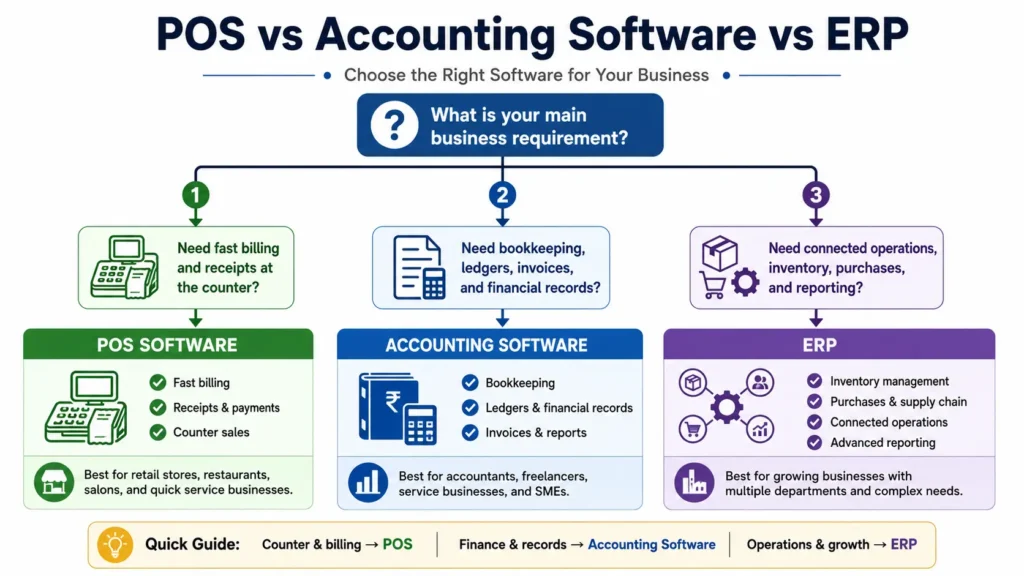
POS handles sales transactions, accounting software manages financial records, and ERP connects operational and financial workflows.| Capability | Excel / Registers | Accounting Software | POS Software | ERP Software |
| Counter billing | Manual | Sometimes | Core feature | Usually available |
| Inventory movement | Manual | Limited / varies | Varies | Connected to transactions |
| Purchases | Separate | Financial focus | Often limited | Connected workflow |
| Supplier management | Manual | Usually available | Varies | Connected |
| Double-entry accounting | No | Core feature | Usually limited | Available by scope |
| Expenses | Separate/ manual | Yes | Varies | Connected |
| Manufacturing | No | Rarely | Rarely | Available by scope |
| Operational reporting | Manual | Mainly financial | Mainly sales | Operational + financial |
| Role-based access | Manual | Varies | Varies | Common requirement |
| Multi-location support | Manual | Varies | Varies | Available by scope |
Choose POS Software When
Choose POS when the main requirement is fast counter billing without deeper purchasing, accounting or operational integration.Choose Accounting Software When
Choose accounting software for bookkeeping, ledgers, receivables, payables and financial reporting.Choose ERP Software When
Choose ERP when sales, stock, purchasing, expenses, suppliers, accounts and reporting need to work together. Start with the workflow problem, not the software label.Not sure whether you need POS, accounting software or ERP?
Share your current process with HisaabPro and evaluate the right fit before choosing a system.
Discuss Your Requirements →
What Features Should ERP Software in Pakistan Include?
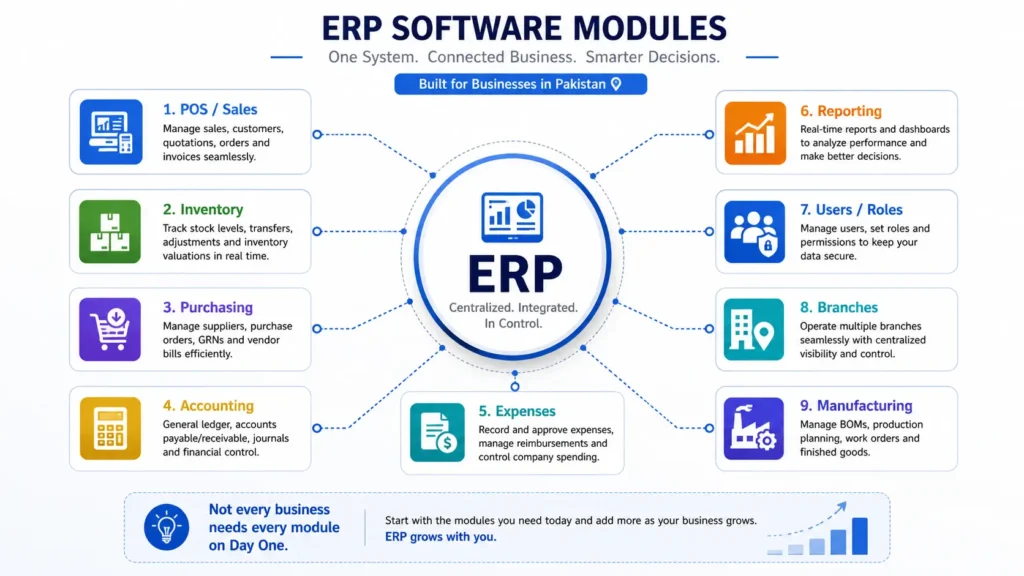
Requirements vary, but a practical ERP system in Pakistan may include the following capabilities.POS and Billing
Fast billing, invoices, receipts, quotations, product lookup and customer returns, with sales affecting stock and accounts where required.Inventory Management
Product and SKU records, stock receiving, sales deductions, returns, adjustments, transfers, warehouse quantities and inventory reports. The figures should come from business transactions rather than a separate spreadsheet.Purchasing and Supplier Management
Supplier orders, goods received, supplier bills, balances and purchasing reports, with purchases updating inventory and financial records.Accounting
Chart of accounts, general ledger, receivables, payables, journal entries, cash and bank records, and financial reports where included in scope.Expense Management
Operating expenses recorded within the same system rather than separate registers or spreadsheets.Business Reporting
Reports for sales, purchases, inventory, expenses, customer and supplier balances, cash position and financial performance, based on connected records.Role-Based Access
Separate permissions for owners, managers, cashiers, accountants and other users according to their responsibilities.Multi-Branch and Multi-Warehouse Management
Branch-level reports, warehouse inventory, transfers, consolidated reporting and location-specific permissions.Manufacturing Workflows
Raw materials, bills of materials or recipes, production orders, material consumption, production stages, wastage, finished goods and production costing.Urdu and English Support
Businesses whose teams work more comfortably in Urdu should confirm suitable language support. Not every company needs every module on day one. Start with the processes causing the biggest operational problems and expand when needed.Which ERP modules should you start with?
Let HisaabPro review your current workflow and identify the modules worth evaluating first.
Plan Your ERP Scope →
ERP Software and FBR Digital Invoicing in Pakistan
Businesses evaluating ERP software in Pakistan should determine whether FBR electronic-invoicing requirements apply to them. FBR's current guidance states that electronic invoicing is mandatory for applicable corporate and non-corporate registered persons and explains integration for POS, ERP and invoicing systems. FBR states: “Only a licensed integrator having a valid FBR license can configure” the applicable electronic invoicing software. Buying ERP software does not automatically make a business compliant. During a demonstration, ask whether FBR digital invoicing applies, how invoices are generated and integrated, who handles and maintains the integration, whether a licensed integrator is required and whether integration charges are included. Verify current obligations through official FBR guidance and, where necessary, a qualified tax professional.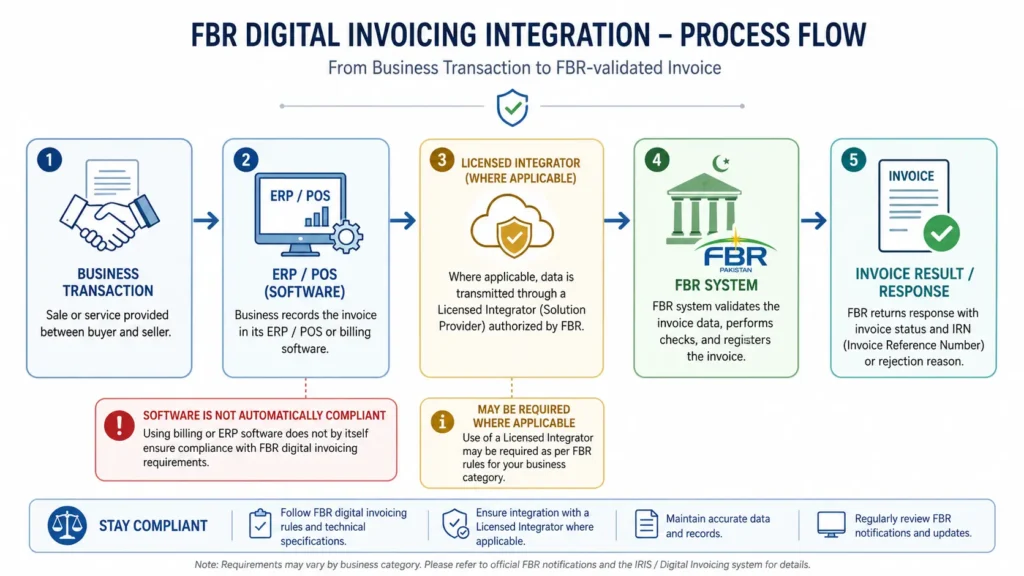
Cloud ERP vs On-Premise ERP
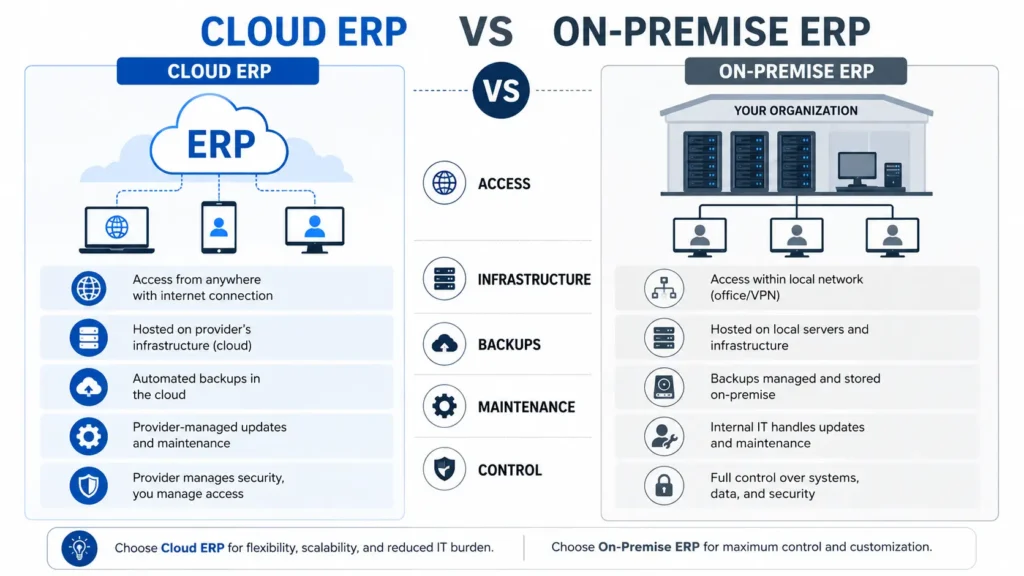
Cloud ERP is usually provider-hosted and internet-accessed. On-premise ERP runs on infrastructure controlled locally by the business. Neither is automatically better.| Factor | Cloud ERP | On-Premise ERP |
| Access | Usually internet-based | Usually local infrastructure |
| Initial infrastructure | Lower local setup requirement | Server/setup may be required |
| Updates | Often provider-managed | May require internal/vendor support |
| Remote access | Generally easier | Depends on configuration |
| Internet dependency | Usually higher | Some local access may continue |
| Backups | Often provider-led; verify terms | Usually business/IT responsibility |
| Infrastructure control | Provider dependent | Greater local control may be possible |
| Maintenance | Often subscription-based | May require separate maintenance |
Cloud or on-premise ERP?
Compare both options against your users, access requirements, infrastructure and business workflow.
Compare Deployment Options →
How Much Does ERP Software Cost in Pakistan?
ERP software cost in Pakistan depends on users, modules, locations, migration, customization, integrations, hosting, support and implementation scope. There is no single price for every ERP project. Pricing may use monthly or annual subscriptions, license fees, per-user charges, module-based pricing, implementation fees or custom quotations. Comparing only the advertised subscription can therefore be misleading.Compare Total First-Year ERP Cost
Total first-year ERP cost = software + implementation + migration + training + customization + integrations + hosting + support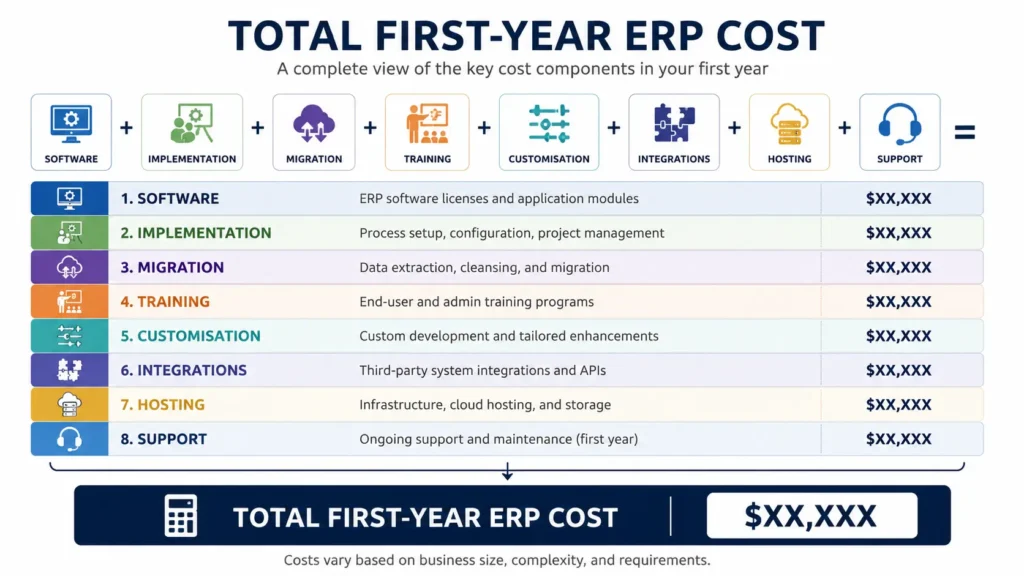
| Cost Area | What to Confirm |
| Software | Monthly, annual or license charge |
| Users | Included users and additional-user fees |
| Modules | Included and optional modules |
| Implementation | Setup, configuration and workflow mapping |
| Migration | Products, customers, suppliers, stock and opening balances |
| Training | Sessions and employee roles covered |
| Customization | Forms, reports, permissions and workflow changes |
| Integrations | FBR, ecommerce, payments or other systems |
| Hosting | Included or separately charged |
| Support | Channels, hours and response expectations |
| Upgrades | Included or separately billed |
| Exit | Data export, cancellation and transition costs |
A Better Way to Compare ERP Prices and Quotations
Send the same requirements document to every shortlisted vendor. Ask each vendor to mark every item as Included, Optional, Requires customization, Requires integration, Not available or Charged separately. Compare first-year and recurring costs, scope, users, modules, migration, training, integrations, support commitments and exit conditions. This avoids comparing packages with different scopes.Comparing ERP quotations?
Ask HisaabPro to map its proposed scope against your actual requirements so you can compare like for like.
Request a Requirements Review →
What Factors Affect ERP Software Price in Pakistan?
Users
Some products charge according to users or user tiers.Products and SKUs
Large catalogues require more preparation, validation and migration.Branches and Warehouses
More locations can add transfers, permissions, separate inventories and consolidated reporting.Modules
Manufacturing, advanced inventory, multi-warehouse operations and specialized accounting increase complexity.Data Quality
Duplicate products, incomplete customer records and incorrect opening balances create more migration work.Customization
Non-standard workflows, reports, approvals and integrations require additional configuration or development.Training
Larger teams may need several role-specific sessions.Hosting
On-premise deployment may add server, backup, networking and maintenance costs.Support
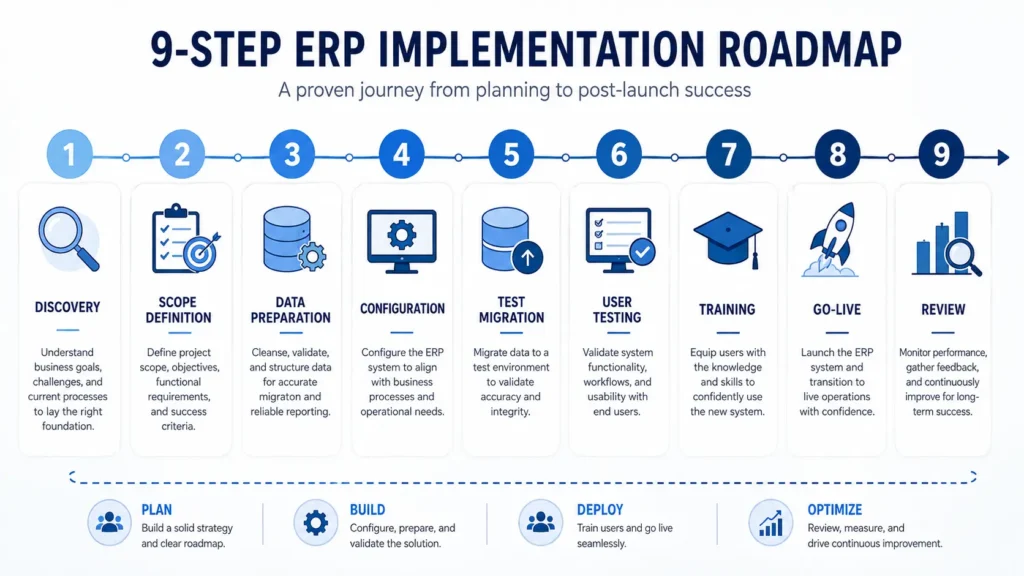
Dedicated or extended support can increase ongoing cost.How Does ERP Implementation Work?
ERP implementation is a business-process project, not simply software installation.Workflow Discovery
Document current sales, inventory, purchasing, expenses, accounts, approvals and reporting.Scope Definition
Agree on modules, users, branches, warehouses, reports, integrations and migration.Data Preparation
Clean products, customers, suppliers, inventory and opening balances.System Configuration
Configure roles, accounts, invoice formats, products, taxes, permissions and workflows.Test Migration
Import sample records and compare them with the original data.User Acceptance Testing
Employees test realistic sales, returns, purchases, expenses, stock adjustments, payments and reports.Training
Train employees according to their roles rather than giving everyone the same generic demonstration.Go-Live
Import final approved data and begin live processing.Post-Launch Review
Review errors, user questions, reporting requirements and workflow improvements. Implementation time depends on project complexity. Vendors should identify the main dependencies before committing to a date.Want an implementation timeline based on your business?
Share your scope, users, locations and migration requirements with HisaabPro.
Request an Implementation Assessment →
How Does ERP Data Migration Work?
ERP data migration prepares, validates and moves reliable information from existing spreadsheets, registers or software into the new ERP. The process includes identifying required records, removing duplicates, standardizing product names, codes and units, preparing customer and supplier records, confirming opening stock and balances, testing the import, checking totals, correcting errors and retaining a secure copy of the original data.Who is responsible for cleaning incorrect source data before migration?
Some ERP providers import exactly what the client supplies; others may offer data-cleaning support. Document the responsibility before implementation.What Should You Check About ERP Security and Data Ownership?
A general claim that “your data is secure” is not enough.Data Ownership
Confirm who owns the data, available export formats and what happens after cancellation.Backups
Ask how often backups are created, where they are stored, how long they are retained and how restoration is tested.User Access
Confirm separate permissions for owners, managers, cashiers, accountants and other roles.Audit Trail
Ask whether important transactions and system changes can be traced to the responsible user.Recovery
Understand what happens if the provider or local system experiences downtime.Remote Access
Ask how remote authentication and permissions are controlled. Security should be a documented process with clear responsibilities, not just a product claim.Have questions about access, backups or data ownership?
Ask HisaabPro for the relevant security, access-control and data-handling details for your proposed setup.
Discuss ERP Security →
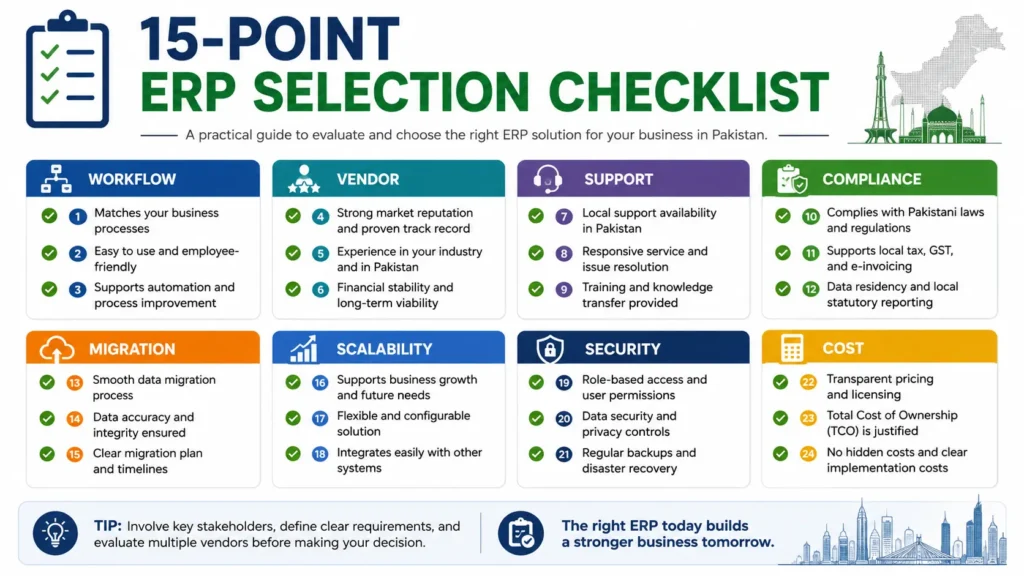
How to Choose ERP Software in Pakistan: 15-Point Checklist
Compare systems against your workflows, implementation requirements, support needs and total cost - not feature count alone.1. Does the ERP Connect Your Main Processes?
Check whether billing, inventory, purchasing, expenses and accounts work together.2. Can the Vendor Demonstrate Your Workflow?
Ask for a realistic business scenario, not only a generic feature tour.3. Does It Support the Language Your Team Uses?
Confirm Urdu or English support where required.4. Is Practical Support Available?
Confirm phone, email, WhatsApp, help desk or other suitable channels.5. What Are the Support Hours and Response Expectations?
Ask how normal and critical issues are handled.6. Can the Applicable FBR Workflow Be Demonstrated?
Where electronic invoicing applies, ask the vendor to explain the integration.7. Can Owners Access Reports Remotely?
Confirm remote access and reporting requirements.8. How Will Existing Data Be Migrated?
Cover products, customers, suppliers, stock, balances and relevant history.9. What Training Is Included?
Confirm employee roles and the number of sessions.10. Can the System Scale?
Consider future users, products, transactions, warehouses and branches.11. Does It Support Manufacturing if Required?
Do not assume support for production, recipes, BOMs or manufacturing costing.12. Can User Permissions Be Controlled?
Different roles may require different access.13. Can the Business Export Its Data?
Confirm the format and included data.14. Can the Demo Use Your Business Scenario?
Realistic data exposes workflow gaps more effectively than a standard presentation.15. Is the Complete Cost Documented?
Confirm software, implementation, migration, training, customization, integrations, hosting, support and upgrades. Unclear answers before purchase should be treated as a selection risk.Ready to put HisaabPro through the same checklist?
Use your own requirements and business scenario in the product discussion.
Evaluate HisaabPro for Your Business →
What Is the Best ERP for a Small Business in Pakistan?
The best ERP for a small business in Pakistan covers essential workflows without unnecessary cost or complexity. A retailer may need POS, inventory, purchases, expenses, accounts and daily reporting. A distributor may need customer credit, supplier management, warehouses and delivery workflows. A manufacturer may require materials, production and costing. Define the processes, users, products, locations, reports, integrations, budget and expected growth before comparing systems. A focused ERP that employees use correctly can deliver more value than a larger system with unused modules.Looking for ERP without unnecessary complexity?
Discuss the workflows your business actually needs and build the starting scope around them.
Find Your ERP Starting Scope →
ERP Requirements by Industry
ERP for Retail Businesses
Retailers commonly need POS billing, product lookup, sales-linked inventory, returns, cashier permissions, pricing controls and daily reports. Test a counter sale and check its effect on stock and reporting.ERP for Wholesalers and Distributors
Typical requirements include supplier purchasing, bulk inventory, customer balances, credit management, customer-specific pricing, warehouse movement and delivery workflows.ERP for Pharmacies
Pharmacies may need batch and expiry tracking, supplier purchases, returns and product-level inventory controls. Ask for a live demonstration rather than relying on an industry label.ERP for Manufacturing Businesses
Manufacturing may require raw materials, bills of materials, recipes, production orders, material consumption, wastage, finished goods and production costing. Test the workflow from material purchase to finished stock.ERP for Service and Education Businesses
These organizations may focus on customer or student records, billing or fees, receivables, expenses, permissions and financial reporting. Ask vendors to demonstrate the exact process your business needs.Who Needs ERP Software?
ERP may be appropriate when sales, stock and accounts are separate; staff repeat data entry; stock or supplier balances are unreliable; reports require manual preparation; several users or locations need control; or current applications cannot support growth.Who May Not Need ERP?
A full ERP may be unnecessary when the business only needs basic billing, has little or no inventory, already has one system covering the workflow, is not ready to standardize processes or would gain little value from the added complexity. In these cases, dedicated POS or accounting software may be more appropriate.Common ERP Implementation Mistakes
Buying Too Many Modules
Start with the workflows causing measurable problems rather than every available feature.Migrating Poor-Quality Data
Clean duplicate products, inconsistent units and incorrect balances before migration.Underestimating Employee Training
A technically correct system can fail when employees do not know how and when to record transactions.Automating a Broken Process
Use implementation to simplify unnecessary steps rather than recreate every workaround.Skipping User Testing
Actual users should test realistic transactions before launch.Comparing Only Subscription Prices
Subscription or license price represents only part of the implementation cost.Failing to Assign Internal Ownership
Assign responsibility for products, pricing, users, permissions, approvals, data quality and communication with the ERP provider.Questions to Ask During an ERP Demo
Ask the vendor to demonstrate a customer sale, inventory movement, accounting effect, return, supplier purchase, stock adjustment, restricted permissions, management reporting, data export, recovery procedure, applicable FBR workflow and one industry-specific scenario. This is more useful than asking only, “What features does your ERP have?”Don't settle for a generic ERP demo.
Ask HisaabPro to run your sales, inventory, purchasing and reporting scenario live.
Book a Scenario-Based Demo →